原文地址 www.360mb.net
前言说明 在我们使用 WordPress 写文章时可能用不到这个功能,但对于搬站的站长还是挺有用,因为我们很多站长发布的文章基本上都不是自己写的,大多数都是复制粘贴别人的,因为是复制粘贴,这样链接是别人的,……
前言说明
在我们使用 WordPress 写文章时可能用不到这个功能,但对于搬站的站长还是挺有用,因为我们很多站长发布的文章基本上都不是自己写的,大多数都是复制粘贴别人的,因为是复制粘贴,这样链接是别人的,对于 SEO 也别不是很友好,也容易失效,如果我们手动处理,工作量也太大了,下面的代码我们能实现自动保存图片,并把第一张图设置为特色图像,使用起来更加方便。
教程方法
代码方式
- 大家可以把下面的代码复制到自己当前主题的 “functions.php” 文件里:
add_action('save_post', 'fetch_images');
add_action('publish_post', 'fetch_images');

function fetch_images( $post_ID )
{
    //Check to make sure function is not executed more than once on save
    if ( defined('DOING_AUTOSAVE') && DOING_AUTOSAVE )
    return;

    if ( !current_user_can('edit_post', $post_ID) )
    return;

    //Check if there is already a featured image; if there is, then quit.
    if ( '' != get_the_post_thumbnail() )
    return;

    remove_action('save_post', 'fetch_images');
        remove_action('publish_post', 'fetch_images');

    $post = get_post($post_ID);

    $first_image = '';

    if(preg_match_all('/<img.+src=[\'"]([^\'"]+)[\'"].*>/i', $post->post_content, $matches)){
        $first_image = $matches [1] [0];
    }

    if (strpos($first_image,$_SERVER['HTTP_HOST'])===false)
    {

        //Fetch and Store the Image
        $get = wp_remote_get( $first_image );
        $type = wp_remote_retrieve_header( $get, 'content-type' );
        $mirror = wp_upload_bits(rawurldecode(basename( $first_image )), '', wp_remote_retrieve_body( $get ) );

        //Attachment options
        $attachment = array(
        'post_title'=> basename( $first_image ),
        'post_mime_type' => $type
        );

        // Add the image to your media library and set as featured image
        $attach_id = wp_insert_attachment( $attachment, $mirror['file'], $post_ID );
        $attach_data = wp_generate_attachment_metadata( $attach_id, $first_image );
        wp_update_attachment_metadata( $attach_id, $attach_data );
        set_post_thumbnail( $post_ID, $attach_id );

        $updated = str_replace($first_image, $mirror['url'], $post->post_content);

        //Replace the image in the post
        wp_update_post(array('ID' => $post_ID, 'post_content' => $updated));

        // re-hook this function
        add_action('save_post', 'fetch_images');
      add_action('publish_post', 'fetch_images');
    }
}
全选代码复制
注意:本代码不适合那种直接用采集插件或火车头类采集远程图像入库的!
插件方式
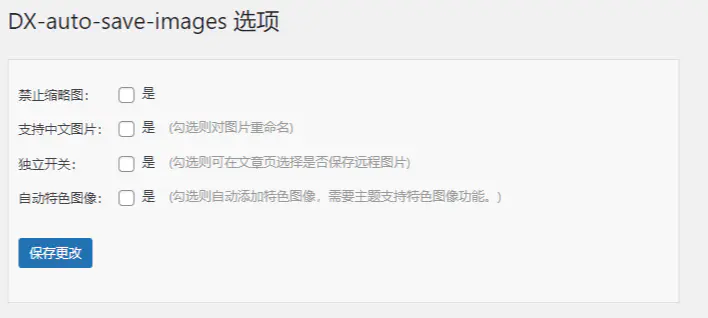
- 大家可搜索安装 “DX Auto Save Images” 插件(WordPress 自动同步远程图片插件),这个插件也能自动同步远程图片也能自动设置特色图片